

When an email says “follow up,” it means there’s a need for further action. It’s a reminder to check back on something or continue a conversation.
In our busy digital world, emails are essential for communication. But sometimes, the messages can be a bit unclear. Seeing “follow up” in your inbox might leave you wondering what to do next. This term is common in business and personal emails.
It signals that the conversation isn’t over yet. Understanding its meaning can help you manage your tasks better. In this blog post, we’ll explore what “follow up” means in emails and why it’s important. Let’s dive in and clear up any confusion.
Introduction To Follow-up Emails
Follow-up emails are crucial in professional communication. They help maintain relationships and ensure tasks are completed. This section will explain the purpose and importance of follow-up emails.
Contents
- 1 Purpose Of Follow-up Emails
- 2 Importance In Communication
- 3 Types Of Follow-up Emails
- 4 Reminder Emails
- 5 Recommendations for Improving Follow-Up Newsletters
- 6 When To Send Follow-up Emails
- 7 Crafting Effective Follow-up Emails
- 8 Personalizing Follow-up Emails
- 9 Common Mistakes To Avoid
- 10 Tools For Managing Follow-up Emails
- 11 Crm Integration
- 12 Measuring Follow-up Email Success
- 13 Frequently Asked Questions
- 14 Conclusion
Purpose Of Follow-up Emails
The main purpose of follow-up emails is to remind someone about a previous interaction. This could be a meeting, a job application, or a sales pitch. Follow-up emails ensure that important matters are not forgotten. They also show that you are proactive and organized.
Here are some common purposes:
- To remind someone about a meeting or appointment
- To thank someone for their time
- To ask for a response or feedback
- To provide additional information or resources
A well-crafted follow-up email can help you achieve your goals. It can also strengthen your professional relationships.
Importance In Communication
Effective communication is key in any relationship. Follow-up emails play a vital role in this process. They ensure that all parties are on the same page. They also help in clarifying any misunderstandings.
Here are some reasons why follow-up emails are important:
- Timeliness: They help you stay on track with deadlines.
- Professionalism: They show that you are diligent and respectful.
- Relationship Building: They help you build and maintain strong professional relationships.
- Accountability: They ensure that tasks and responsibilities are clear.
Follow-up emails are not just about reminders. They are about maintaining a clear line of communication. They help you stay connected and informed.
Types Of Follow-up Emails
Understanding the different types of follow-up emails is crucial for effective communication. Each type serves a unique purpose and can help build better relationships. Here’s a detailed look at some common types of follow-up emails.
Thank You Emails
Thank You Emails are sent to express gratitude. These emails can help reinforce positive interactions. They show appreciation and foster goodwill. You might send a thank you email after an interview, meeting, or receiving a gift.
- After an interview
- After a meeting
- After receiving a gift or favor
Example: “Thank you for taking the time to meet with me. I appreciate your insights and look forward to our collaboration.”
Reminder Emails
Reminder Emails help ensure tasks or events are not forgotten. These are crucial for busy schedules. They can remind someone about an upcoming deadline, meeting, or event. Keep them short and to the point.
- Meeting reminders
- Deadline reminders
- Event reminders
Example: “This is a reminder about our meeting tomorrow at 10 AM. Please bring the project files.”
Checking In Emails
Checking In Emails are used to maintain relationships. These emails show you care and are thinking about the recipient. They can be sent to catch up, follow up on a previous conversation, or see how someone is doing.
| Purpose | Example |
|---|---|
| Catch Up | “Hi, it’s been a while. How have you been?” |
| Follow Up | “Just checking in to see if you had any updates on the project.” |
| Well-being | “I hope you’re doing well. Let’s catch up soon.” |
These emails help keep the lines of communication open. They are essential for nurturing relationships over time.
Recommendations for Improving Follow-Up Newsletters
Follow-up newsletters are your chance to keep the conversation going. Whether you’re checking in after a free download, a purchase, or just a friendly hello, your follow-up emails should feel thoughtful not pushy.
Start by writing like a human. Use a friendly tone, short sentences, and words people actually say. No one wants to read a sales pitch pretending to be a “quick check-in.” Instead, try opening with something like, “Hey, just wanted to pop in and see if you had a chance to try that guide we sent.”
Make sure your email gives them something new. Don’t just repeat the first message. Add value maybe a helpful tip, a success story, a bonus resource, or a reminder of the benefit they signed up for. Every email should feel like a little gift, not just a nudge.
Timing matters, too. Space your emails out. Don’t crowd their inbox. A few well-timed messages—sent over a week or two work better than a flood of reminders in one day.
And don’t forget the subject line. That’s what gets your email opened. Make it personal, curious, or playful. Something like “Still thinking about it?” works better than “Follow-up #2.”
Lastly, always make it easy to unsubscribe. It shows respect, builds trust, and helps keep your list clean and engaged.
When To Send Follow-up Emails
Follow-up emails are essential for maintaining communication. Knowing when to send them can make a huge difference. It ensures your message isn’t overlooked and increases your chances of a response. Here’s a guide to help you decide the best timing and frequency for your follow-up emails.
Timing Considerations
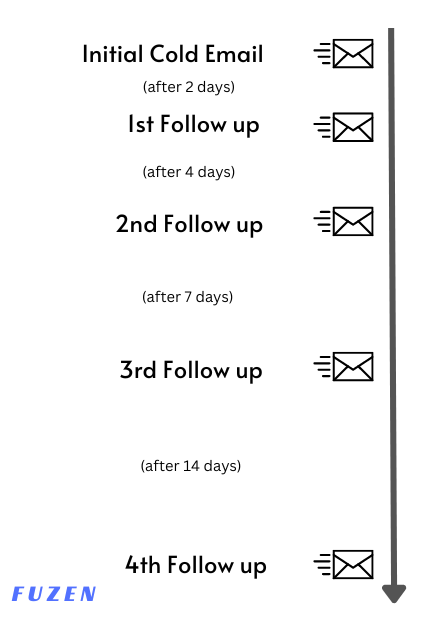
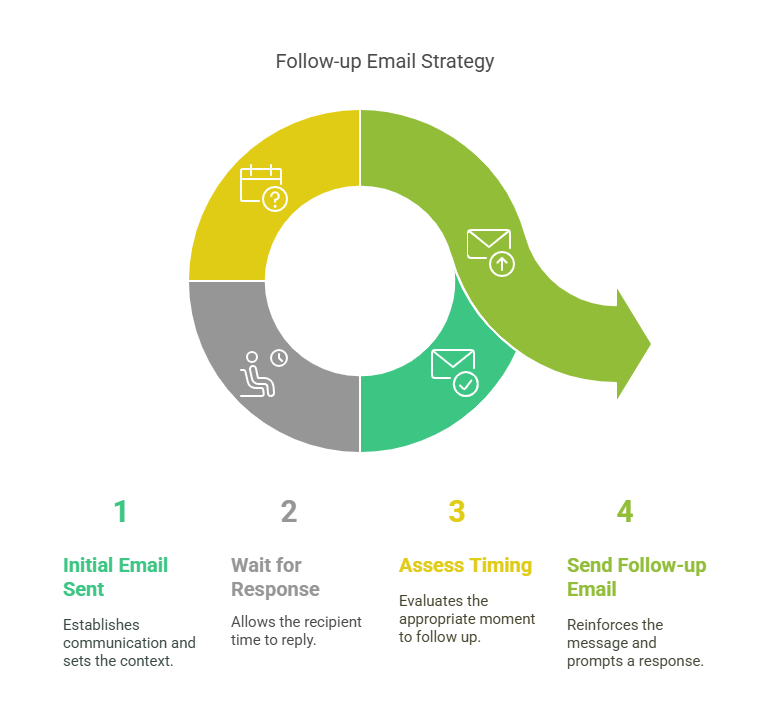
Timing plays a crucial role in follow-up emails. Send your first follow-up a few days after your initial email. This shows you’re interested but not pushy.
Consider the recipient’s time zone and working hours. Sending emails at 9 AM or 2 PM often works best. This increases the likelihood of your email being read promptly.
If your email remains unanswered, wait a week before sending another follow-up. This gives the recipient time to respond without feeling rushed.
Frequency Of Follow-ups
The frequency of your follow-up emails depends on the context. For job applications, limit follow-ups to once a week. Three follow-ups are usually enough before moving on.
In sales or client interactions, follow up every few days. Ensure you provide new information or value in each email.
Avoid sending follow-ups daily. This can annoy the recipient and hurt your chances of getting a response.
| Scenario | Initial Follow-Up | Subsequent Follow-Ups |
|---|---|---|
| Job Applications | 3-5 days after application | Once a week, up to 3 times |
| Sales or Client Interaction | 2-3 days after initial email | Every 3-4 days |
Remember to keep your follow-up emails concise and to the point. Be polite and express your continued interest. This approach increases your chances of receiving a response.
Crafting Effective Follow-up Emails
Writing a good follow-up email is key to making an impact. It is more than just a reminder. It’s about showing you care and are professional. Here are some tips to help you craft effective follow-up emails.
Subject Line Tips
The subject line is the first thing your reader sees. It should be clear and direct. Here are some tips for writing subject lines:
- Keep it short and specific.
- Use action words like “Reminder” or “Follow-Up”.
- Include the main topic or reason for the email.
- Personalize it with the recipient’s name.
Examples:
- Reminder: Meeting Tomorrow at 3 PM
- Follow-Up: Your Feedback on Project Proposal
- Question About: Last Week’s Presentation
Body Content Strategies
The body of your follow-up email should be concise and to the point. Here are some strategies to help you:
- Start with a greeting: Address the recipient by name.
- State the purpose: Clearly mention why you are following up.
- Provide context: Remind the reader of your previous interaction.
- Include a call to action: What do you want the reader to do next?
- Close politely: End with a courteous sign-off.
Example:
Hi [Recipient's Name],

I hope this email finds you well. I am writing to follow up on our meeting last week. We discussed the new project proposal and I wanted to get your feedback.

Could you please let me know your thoughts by the end of this week?

Thank you for your time.

Best regards,
[Your Name]
Personalizing Follow-up Emails
Personalizing follow-up emails can make a big difference. It shows that you care about the recipient. It also increases the chance of getting a response. Let’s look at some ways to personalize your follow-up emails.
Using Recipient’s Name
Always start your email with the recipient’s name. It catches their attention. It makes them feel special. For example, instead of “Hello,” write “Hello, John.” This small change can make your email more engaging.
| Generic | Personalized |
|---|---|
| Hello, | Hello, John, |
| Hi there, | Hi there, Sarah, |
Referencing Previous Conversations
Referencing previous conversations shows that you remember your last interaction. This makes your email more relevant. For example, you could write, “I enjoyed our chat about marketing trends last week.” This reminds the recipient of your last conversation and shows continuity.
- Example 1: “I enjoyed our chat about marketing trends last week.”
- Example 2: “Following up on our meeting about the new project.”
- Example 3: “I hope your presentation went well yesterday.”
Personalizing follow-up emails is not hard. Use the recipient’s name. Refer to past conversations. These small changes can make a big impact.
Common Mistakes To Avoid
Writing a follow-up email may seem simple, but there are common mistakes people often make. These mistakes can lead to misunderstandings or even damage your professional relationships. Below, we will discuss two major pitfalls: an overly aggressive tone and lack of clarity.
Overly Aggressive Tone
An aggressive tone in your follow-up email can be off-putting. It might make the recipient feel pressured or uncomfortable. Avoid using words or phrases that sound demanding. For example:
| What to Avoid | Better Option |
|---|---|
| “Why haven’t you responded yet?” | “I hope you had the time to review my email.” |
| “I need an answer now.” | “Could you please let me know your thoughts?” |
Maintaining a polite and respectful tone encourages a positive response. Always aim to express your needs without sounding forceful.
Lack Of Clarity
Being clear in your follow-up email is crucial. If the recipient cannot understand your message, they are less likely to respond. Make sure your email is straightforward and to the point.
Here are some tips to ensure clarity:
- Use simple and direct language.
- Clearly state the purpose of your email.
- Include any necessary details or context.
For instance, instead of saying “I was wondering about our last discussion,” you could say “Can you please provide an update on the project timeline we discussed last week?”
This way, the recipient knows exactly what you are referring to and what you need from them.
Avoiding these common mistakes will make your follow-up emails more effective and professional.
Tools For Managing Follow-up Emails
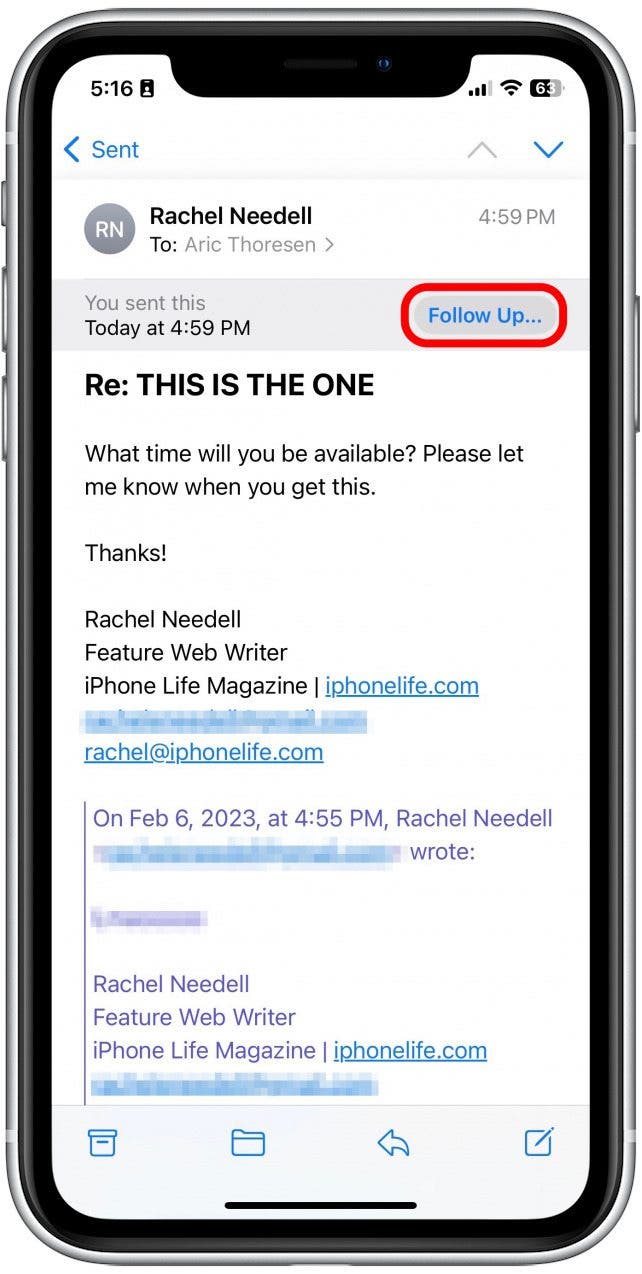
Managing follow-up emails is crucial for maintaining effective communication. The right tools can streamline this process and ensure no opportunity slips through the cracks. Below, we explore some essential tools that can help you manage follow-up emails efficiently.
Email Automation Software
Email automation software can save time and reduce manual effort. With these tools, you can schedule and send follow-up emails automatically. This helps maintain consistent communication without the need for constant oversight.
Here are some popular email automation tools:
- Mailchimp: User-friendly and suitable for small businesses.
- Sendinblue: Offers advanced features for email campaigns.
- HubSpot: Integrates well with marketing efforts.
Email automation software often includes features like:
- Personalized email templates
- Automated scheduling
- Tracking and analytics
Crm Integration
Customer Relationship Management (CRM) systems help keep track of interactions with clients. Integrating your email follow-up process with a CRM can provide a seamless experience.
Key benefits of CRM integration include:
- Centralized Information: All client data in one place.
- Automated Follow-Ups: Set triggers for automatic follow-ups.
- Enhanced Tracking: Monitor email open rates and responses.
Popular CRM tools that offer email integration:
- Salesforce: Comprehensive and customizable.
- Zoho CRM: User-friendly and affordable.
- Pipedrive: Visual and intuitive interface.
Integrating your CRM with email tools ensures efficient management of follow-ups. This improves client relationships and enhances productivity.
Measuring Follow-up Email Success
Understanding the success of your follow-up emails is crucial. It helps you refine your strategy and achieve your goals. By analyzing specific metrics, you can gauge how well your emails perform. Let’s dive into the key metrics for measuring follow-up email success.
Open Rate Metrics
The open rate is a vital metric. It tells you how many recipients opened your email. A high open rate indicates that your subject line was compelling.
To improve your open rate, consider the following tips:
- Use personalized subject lines.
- Keep your subject lines short and clear.
- Avoid spammy words like “free” or “urgent”.
Tracking open rates helps you understand what resonates with your audience. Use this data to optimize future emails.
Response Rate Analysis
Response rate measures how many people replied to your follow-up email. It’s a strong indicator of engagement and interest.
To boost your response rate, consider these strategies:
- Ask clear, specific questions in your email.
- Ensure your email is easy to read and respond to.
- Follow up at the right time, without being too persistent.
Analyzing response rates helps you identify effective follow-up approaches. It also provides insights into your audience’s preferences.
| Metric | Importance | Tips for Improvement |
|---|---|---|
| Open Rate | Indicates subject line effectiveness. | Personalize, keep it short, avoid spam words. |
| Response Rate | Shows engagement and interest. | Ask clear questions, easy to read, timely follow-ups. |
By focusing on these metrics, you can enhance your follow-up email strategy. This leads to better engagement and more successful outcomes.

Frequently Asked Questions
What Does “follow Up” Mean In An Email?
“Follow Up” in an email means to continue a previous conversation. It indicates a reminder or additional information.
Why Should You Follow Up On Emails?
Following up on emails ensures important matters are addressed. It helps maintain communication and shows professionalism.
When To Send A Follow-up Email?
Send a follow-up email after a reasonable time. Typically, this is 2-3 days after no response.
How To Write An Effective Follow-up Email?
To write an effective follow-up email, be polite and concise. Restate your initial message and specify your request.
Conclusion
Understanding the meaning of “follow up” in emails is crucial. It helps you stay organized and responsive. Always respond promptly to maintain good communication. This builds trust and shows professionalism. Remember to be clear and concise in your replies. Keep your emails short and to the point.
This ensures your message is understood. Following up properly can enhance your relationships and opportunities. So, take action and stay on top of your email game. Your efforts will surely pay off.
