

A Gmail email account costs nothing. It is completely free to set up and use.
Gmail, a popular email service by Google, is well-known for its free account offerings. When you create a Gmail account, you gain access to a user-friendly interface, 15GB of storage, and a suite of integrated apps. This service caters to both personal and professional needs, making it a versatile choice for millions.
Curious about any hidden costs or premium features? Stick around as we dive into the details of what Gmail offers for free and if there are any additional charges you should know about. This will help you understand the value and potential costs associated with using Gmail.

Contents
Introduction To Gmail
Gmail is a popular email service provided by Google. It is known for its user-friendly interface and powerful features. Millions of people use Gmail every day for personal and professional communication. But how much does it cost to have a Gmail account? Let’s start by introducing Gmail.
What Is Gmail?
Gmail is a free email service developed by Google. It was launched in 2004 and has since become one of the most widely used email platforms in the world. Gmail offers a variety of features including:
- Generous storage space
- Advanced spam filtering
- Integration with other Google services
- Customizable themes
These features make Gmail a preferred choice for many users globally.
Popularity And Usage
Gmail’s popularity has grown tremendously since its launch. According to recent statistics:
| Year | Number of Users |
|---|---|
| 2004 | 1 Million |
| 2012 | 425 Million |
| 2023 | Over 1.8 Billion |
Gmail is not only popular among individuals but also among businesses. Many companies use Gmail for their email needs due to its reliability and integration with other Google Workspace tools.
Gmail’s user-friendly interface and powerful features contribute to its widespread use. It is available on both desktop and mobile platforms, making it accessible to users anywhere.
Free Gmail Accounts
Many people often wonder, “How much does a Gmail email account cost?” The good news is, Gmail offers a free option that is packed with many features. This section dives into what you get with a free Gmail account.
Features Of Free Accounts
A free Gmail account comes with a variety of useful features. These features make it a popular choice among users worldwide. Here are some of the key features:
- Email Storage: Get up to 15 GB of free storage for emails and attachments.
- Spam Filter: Gmail’s robust spam filter keeps unwanted emails out of your inbox.
- Mobile Access: Access your email from any device, thanks to the Gmail app.
- Integration: Seamless integration with other Google services like Drive and Calendar.
- Security: Built-in security features like 2-step verification and phishing warnings.
Storage Limits
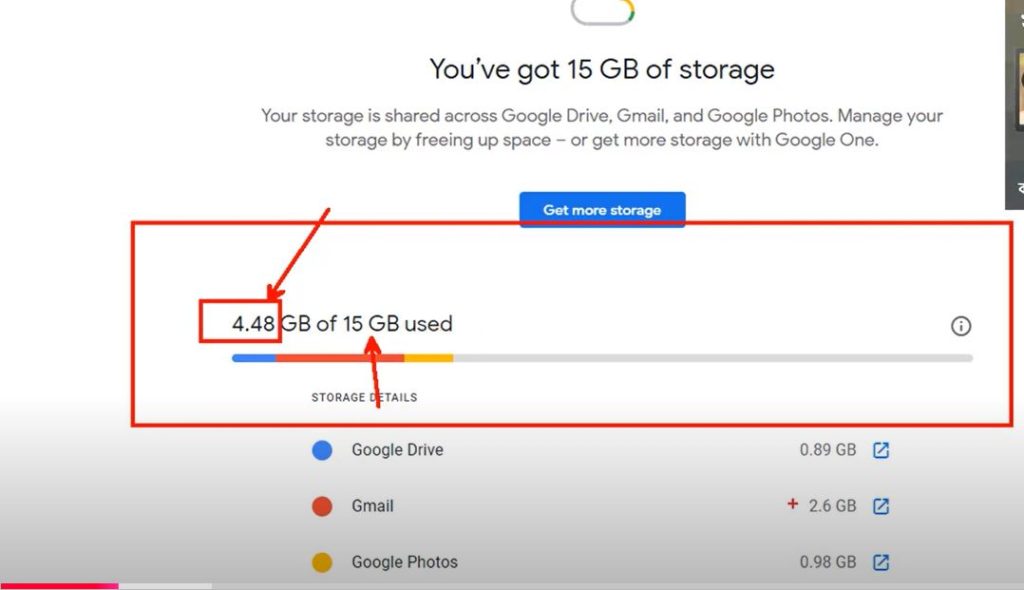
One important aspect of a free Gmail account is its storage limit. Let’s take a closer look at the storage details:
| Feature | Details |
|---|---|
| Free Storage | 15 GB shared across Gmail, Google Drive, and Google Photos. |
| Upgrade Options | Additional storage available through Google One subscriptions. |
With 15 GB of free storage, users can store a large number of emails and attachments. If you need more space, you can always opt for a paid Google One plan.
Paid Gmail Accounts
Many people use Gmail for free, but did you know there are also paid options? These paid Gmail accounts offer many features not available in the free version. They are part of Google’s G Suite, now known as Google Workspace. Let’s dive into the details of these paid accounts.
G Suite Overview
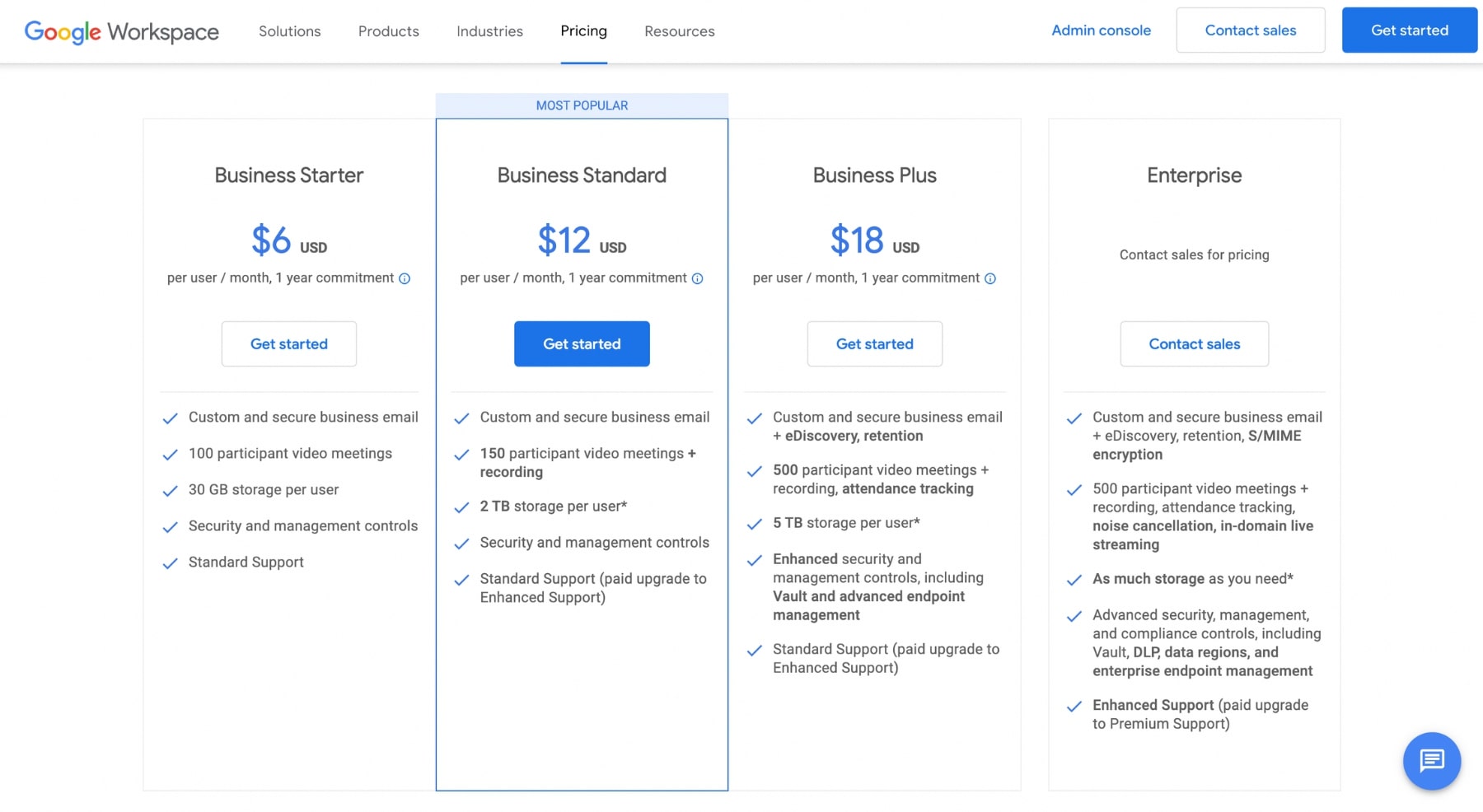
G Suite, or Google Workspace, offers various plans to suit different needs. These plans provide enhanced features and support. They are designed for businesses, schools, and other organizations. Here are the main G Suite plans:
| Plan | Cost | Storage |
|---|---|---|
| Business Starter | $6 per user/month | 30 GB |
| Business Standard | $12 per user/month | 2 TB |
| Business Plus | $18 per user/month | 5 TB |
Benefits Of G Suite
Choosing a paid Gmail account comes with many benefits. First, you get more storage. Free Gmail accounts offer 15 GB, but G Suite plans offer much more. For example, the Business Standard plan provides 2 TB of storage.
Second, G Suite offers professional email addresses. Instead of @gmail.com, you can use your own domain name. This makes your emails look more professional.
Third, there are advanced security features. G Suite includes spam protection, two-step verification, and more. These features help keep your data safe.
Finally, G Suite offers priority support. If you have issues, you can get help quickly. Google’s support team is available 24/7.
- More storage
- Professional email addresses
- Advanced security features
- Priority support
These features make G Suite a great choice for businesses and organizations. Whether you need more storage, better security, or professional email addresses, G Suite has a plan for you.
Gmail Pricing Plans
Gmail offers a range of pricing plans to suit different needs. Whether you’re an individual or a business, there’s a plan for you. Let’s explore the various Gmail Pricing Plans available.
Basic Plan
The Basic Plan is perfect for personal use. It’s free and offers up to 15GB of storage. You get access to Google’s suite of productivity tools. This includes Google Drive, Docs, Sheets, and more.
Key features of the Basic Plan:
- 15GB storage
- Free access to Google Drive
- Basic support
- Ad-supported
Business Plan
The Business Plan is ideal for small to medium-sized businesses. It offers more storage and additional features. The cost is $6 per user per month.
Key features of the Business Plan:
- 30GB storage per user
- Custom email (@yourcompany.com)
- 24/7 support
- Enhanced security
- No ads
Enterprise Plan
The Enterprise Plan is designed for large organizations. It offers unlimited storage and advanced features. The cost is $25 per user per month.
Key features of the Enterprise Plan:
- Unlimited storage
- Advanced admin controls
- Data loss prevention (DLP)
- Enhanced security and compliance
- Priority support
The following table summarizes the key differences between the plans:
| Feature | Basic Plan | Business Plan | Enterprise Plan |
|---|---|---|---|
| Storage | 15GB | 30GB | Unlimited |
| Support | Basic | 24/7 | Priority |
| Security | Basic | Enhanced | Advanced |
| Custom Email | No | Yes | Yes |
| Ads | Yes | No | No |
Comparison Of Free Vs Paid Accounts
When considering a Gmail account, many wonder about the costs. Google offers both free and paid versions. Each has different features and benefits. Below, we compare the two options.
Storage And Features
The free Gmail account provides 15GB of storage. This space is shared across Google Drive, Gmail, and Google Photos. For many users, this is sufficient. It includes basic features like email, spam filtering, and a simple interface.
Paid accounts, part of Google Workspace, offer more storage. They start at 30GB and can go up to 5TB per user. Paid accounts also come with additional features. These include custom email addresses, more advanced spam filtering, and better integration with other Google services.
Here is a quick comparison:
| Feature | Free Account | Paid Account |
|---|---|---|
| Storage | 15GB | 30GB – 5TB |
| Custom Email | No | Yes |
| Advanced Spam Filtering | Basic | Advanced |
Support And Security
Free Gmail accounts come with basic support. Users rely on help articles and community forums. Security features include two-step verification and spam protection.
Paid accounts offer 24/7 customer support. Users get access to live chat, email, and phone support. Security is also enhanced. Features include advanced phishing protection and data loss prevention.
Here is a comparison of support and security features:
| Feature | Free Account | Paid Account |
|---|---|---|
| Customer Support | Basic | 24/7 |
| Phishing Protection | Basic | Advanced |
| Data Loss Prevention | No | Yes |
Credit: mailmeteor.com
How To Upgrade Your Gmail Account
Upgrading your Gmail account can enhance your email experience. It provides more storage and additional features. Whether you need more space or advanced tools, upgrading is simple. Let’s explore how to upgrade your Gmail account.
Step-by-step Guide
- Open your Gmail account.
- Click on the gear icon in the top right corner.
- Select Settings from the dropdown menu.
- Go to the Accounts and Import tab.
- Click on Upgrade Storage.
- Choose your desired plan.
- Enter your payment details.
- Confirm your purchase.
Choosing The Right Plan
Choosing the right plan is crucial. Gmail offers different plans to suit various needs. Let’s look at the available options.
| Plan | Storage | Cost |
|---|---|---|
| Basic | 15 GB | Free |
| Google One 100 GB | 100 GB | $1.99/month |
| Google One 200 GB | 200 GB | $2.99/month |
| Google One 2 TB | 2 TB | $9.99/month |
Consider your storage needs. If you need more space, the 100 GB or 200 GB plans are good options. For heavy users, the 2 TB plan is ideal.
Upgrading your Gmail account can be a game-changer. It offers more features and storage. Follow this guide to make the process easy.
Additional Costs To Consider
While a standard Gmail account is free, there are additional costs that you might need to consider. These costs arise from various add-ons and integrations that can enhance your Gmail experience. Let’s dive into some of these potential expenses.
Add-ons And Extensions
Gmail offers a plethora of add-ons and extensions that can boost productivity. Some of these are free, while others require a subscription or one-time payment. Here are a few popular ones:
- Grammarly: Helps with grammar and spelling. Free basic version, premium plans start at $11.66/month.
- Boomerang: Schedule emails to send later. Basic version is free, paid plans start at $4.99/month.
- Gmelius: Offers project management tools within Gmail. Plans start at $9/month.
Third-party Integrations
Integrating Gmail with third-party services can also incur costs. These integrations can help streamline your workflow and add extra functionality. Here are some common examples:
| Service | Purpose | Cost |
|---|---|---|
| Zapier | Automates tasks between apps | Free for basic use, plans start at $19.99/month |
| Slack | Team communication | Free for basic use, paid plans start at $6.67/month |
| Trello | Project management | Free for basic use, paid plans start at $5/month |
While these costs are optional, they can significantly enhance your Gmail experience. Consider them based on your specific needs and budget.

Frequently Asked Questions
How Much Does A Gmail Account Cost?
A Gmail account is free. You can sign up and use it without any charges. However, additional storage and features are available with Google Workspace subscriptions.
Is Gmail Free To Use?
Yes, Gmail is free to use. You can create an account and access its basic features without paying anything.
Does Gmail Offer Any Paid Plans?
Yes, Gmail offers paid plans through Google Workspace. These plans provide additional storage and business features, starting at $6 per user per month.
Can I Upgrade My Gmail Storage?
Yes, you can upgrade your Gmail storage. Google One offers additional storage plans starting at $1. 99 per month for 100 GB.
Conclusion
Gmail is free and easy to use. It offers various features at no cost. For extra storage or business needs, you can choose paid plans. These plans provide more space and advanced tools. You can decide based on your needs and budget.
Gmail’s free version suits most users. Paid options cater to businesses and heavy users. Explore Gmail and see which plan fits you best. Enjoy seamless email experience with Gmail.
