

Email is an essential tool for communication in our digital lives.
Whether you need a secure platform for personal privacy, reliable email services for everyday use, or a spam-free solution to keep your inbox organized, finding the right email provider can make a big difference.
With so many options available, we’ve put together a guide to help you choose the best email platform tailored to your needs. From the most popular email providers to encrypted email services, we’ve got you covered.
Contents
Why Choosing the Right Email Platform Matters
Your email provider plays a critical role in how you manage digital communication. It’s not just about sending and receiving messages anymore modern email platforms offer features like advanced spam filters, privacy tools, scheduling, and encryption. Whether you’re looking for Gmail alternatives or considering independent email providers, selecting the right email platform ensures:
- Better email privacy and security
- Improved organization and productivity
- Spam-free and clutter-free inboxes
- Reliable customer support when issues arise
Now, let’s explore the most popular email providers and compare their features to help you make the best decision.
The Top Email Providers in 2025
1. Gmail
Perhaps the most well-known name in email services, Gmail by Google has over 1.8 billion users globally. Its integration with Google Workspace makes it ideal for personal and professional use. Gmail offers:
- 15GB of free storage shared across Gmail, Google Drive, and Google Photos
- Smart filtering for spam, promotions, and social emails
- Mobile-friendly design and offline access
- Built-in tools for scheduling and instant translation
However, some users raise concerns about privacy as Google scans emails (for ad purposes) unless you’re a paid Google Workspace user.
2. Outlook
Microsoft’s Outlook is another popular option, especially for those who already use Windows or Office 365. Its clean interface and powerful tools make it an excellent choice for both business professionals and personal users. Key features include:
- Integration with Microsoft Office apps like Word and Excel
- Focused Inbox to prioritize important messages
- 15GB of free storage
- Built-in calendar and task management tools
If you’re looking for a Gmail alternative with similar functionality but without Google’s ecosystem dependency, Outlook is a strong contender.
3. Yahoo Mail
Yahoo Mail may have declined in popularity over the years, but it still offers unique features that make it reliable:
- 1TB of free storage
- Customizable inbox themes
- Smart email organization for receipts, photos, and attachments
- Integrated unsubscribe tools to reduce spam
Yahoo is best for users who handle large volumes of email attachments or need a simple interface for sorting through clutter.
4. iCloud Mail
If you’re part of the Apple ecosystem, iCloud Mail is an excellent option. Available for free to all Apple users, it seamlessly integrates with macOS and iOS devices. Features include:
- 5GB of free storage, shared across all iCloud services
- Simple user-friendly interface
- Enhanced end-to-end encryption for privacy
- Reliable syncing across devices
However, iCloud storage can fill up quickly if you’re using it for photos and backups, so you may need to purchase extra storage.
5. ProtonMail
ProtonMail is a go-to choice for privacy-conscious users. Based in Switzerland, ProtonMail offers strong protections aligned with GDPR regulations. Features include:
- End-to-end encryption to secure your emails
- No tracking or ads
- 500MB of free storage with paid options for more
- Open-source and independently audited
If email privacy is your top priority, ProtonMail is one of the best secure email providers available.
6. Zoho Mail
Zoho Mail is a versatile email system catering to small business owners and independent users alike. It boasts:
- Ad-free experience even in the free plan
- Advanced collaboration tools like shared mailboxes and task management
- Better privacy with no email scanning
- Flexible pricing tiers for individuals and teams
For freelancers and startups, Zoho Mail offers a professional yet affordable way to manage emails.
7. Tutanota
Tutanota is an encrypted email service that prioritizes privacy and offers a streamlined experience. Features include:
- End-to-end encrypted emails
- 1GB of free storage
- No ads or trackers for ultimate email privacy
- Open-source and user-friendly design
This independent email provider is ideal for users seeking a clean, secure email service without breaking the bank.
Comparing the Best Email Providers
To save you time, here’s a quick comparison of the top email services based on their standout features:
| Provider | Free Storage | Security Features | Best For |
|---|---|---|---|
| Gmail | 15GB | Spam filtering | Everyday email, Google users |
| Outlook | 15GB | Two-factor authentication | Office 365 users |
| Yahoo Mail | 1TB | Built-in spam cleanup | High-volume users |
| iCloud Mail | 5GB | End-to-end encryption | Apple users |
| ProtonMail | 500MB | Full encryption | Privacy-focused users |
| Zoho Mail | 5GB (free) | Enhanced privacy | Freelancers and small teams |
| Tutanota | 1GB | Full encryption | Secure communication |
Why Independent Email Providers Are Worth Considering
If you’re concerned about email privacy or wary of mainstream providers like Gmail and Outlook, independent email providers like Tutanota and StartMail offer excellent alternatives. These platforms prioritize encryption and tend to have fewer ads, giving you a more streamlined and private email experience.
Finding the Right Email Platform for You
Selecting the best email provider depends on your specific needs. Ask yourself:
- Do I prioritize storage capacity?
- Is email security and encryption non-negotiable?
- Do I need a service with a built-in calendar or task manager?
- Am I looking for an alternative to big tech providers like Google and Microsoft?
Once you’ve identified your priorities, the choice becomes much easier.
Top Considerations When Choosing an Email Provider
When selecting an email provider, several key factors should influence your decision beyond the features offered. First, consider the level of customer support available; responsive support can be crucial, especially for business emails, where downtime might result in lost opportunities or revenue.
Secondly, the ease of migrating existing data, such as emails and contacts, from another email service can significantly impact your user experience when switching providers. Additionally, assess the email client compatibility, particularly if you frequently use third-party applications to manage emails across different devices.
Lastly, pricing structures should be scrutinized. Even if you initially choose a free plan, understanding upgrade costs and the associated benefits provides better long-term budgeting for personal or professional use. Balancing these considerations will help ensure you select a provider that aligns with both your current and future email needs.
Evaluating Email Providers for Security Enhancements
In today’s digital age, security is one of the most critical aspects to consider when evaluating email providers. With increasing cyber threats, safeguarding personal and business communications should be a priority. Look for providers that offer end-to-end encryption, as this ensures that only the intended recipient can read the message. Providers like ProtonMail and Tutanota excel in this area, offering robust encryption without compromising usability.
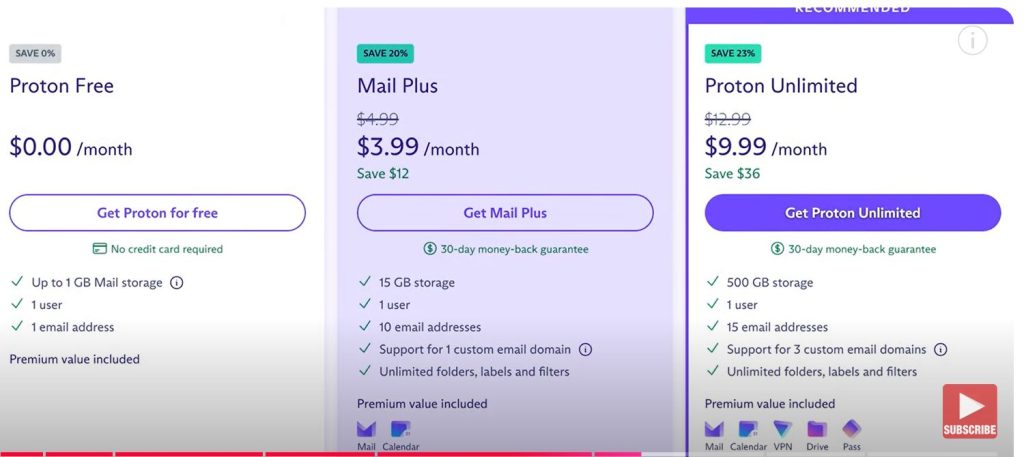
Another crucial security feature is two-factor authentication (2FA), which adds an extra layer of protection by requiring a second form of verification in addition to your password. This can significantly reduce the risk of unauthorized access to your email account. Additionally, some providers offer advanced phishing protection and spam filtering to block malicious attempts before they hit your inbox.
Consider the provider’s data privacy policies, particularly where the data is stored and the jurisdiction under which it falls. Providers based in countries with stringent privacy regulations, such as those following the GDPR, often assure better protection of your data. Thoroughly evaluate these factors to select a provider that offers the best combination of security and privacy suited to your needs.
Refreshing Your Email Strategy

In an era where communication technologies evolve rapidly, it’s important to periodically refresh your email strategy to stay ahead in both personal and professional domains.
Begin by reassessing your current email usage and needs; what worked well a year ago may no longer suit your requirements due to changing demands and technological advancements.
Conduct an audit of your inbox to examine subscription frequencies, identify recurring newsletters you might no longer find relevant, and ensure that important contacts remain prioritized in your communications.
Next, take advantage of any new features or updates your email provider has released. Many services now offer enhanced productivity tools, such as integrated task management and scheduling options. These tools can significantly streamline your workflow if fully utilized.
Additionally, explore any third-party integrations available through your provider, as they can expand functionality by connecting your email to other essential tools you use, such as project management software or cloud storage services.
Finally, embrace automation wherever possible. Setting up filters to automatically organize incoming emails into folders or categories can save you time, reduce clutter, and ensure that critical messages are promptly attended to. As part of this strategy refresh, consider if switching to a new provider might further optimize your communication needs based on the latest market offerings and innovations.
By regularly evaluating and updating your email approach, you ensure that it remains a robust, efficient, and secure component of your digital ecosystem.
Advancing Your Email Efficiency

While a refreshed email strategy offers a foundation for effective communication, enhancing your email efficiency requires a proactive approach to managing your messages. Implementing keyboard shortcuts can significantly speed up email navigation and management tasks, reducing the time spent on routine operations like composing, replying, or archiving messages. Most email clients offer customizable shortcuts that can be tailored to your workflow for maximum productivity.
Additionally, adopting a consistent email checking routine can minimize distractions and help maintain focus on important tasks. Instead of constantly monitoring your inbox, set specific times throughout the day dedicated to processing emails. This practice not only streamlines your communication habits but also contributes to better time management.
Consider employing an inbox-zero approach, striving to keep the inbox clear by immediately responding to actionable emails, deleting irrelevant messages, and organizing or archiving other items. Tools integrated with your email service, like digital notebooks or task managers, can house information or to-do items extracted from your emails, ensuring organized record-keeping and follow-through.
Regularly review your email settings to ensure your notifications, signatures, and storage preferences align with your current needs. Small adjustments, such as consolidating signatures for consistency or optimizing notification alerts to highlight only essential messages, can elevate daily email interactions.
Embracing these efficiency-oriented practices helps you navigate the evolving landscape of digital communication, ensuring that email remains a powerful and effective tool in your professional arsenal.
Exploring Email Customization Options
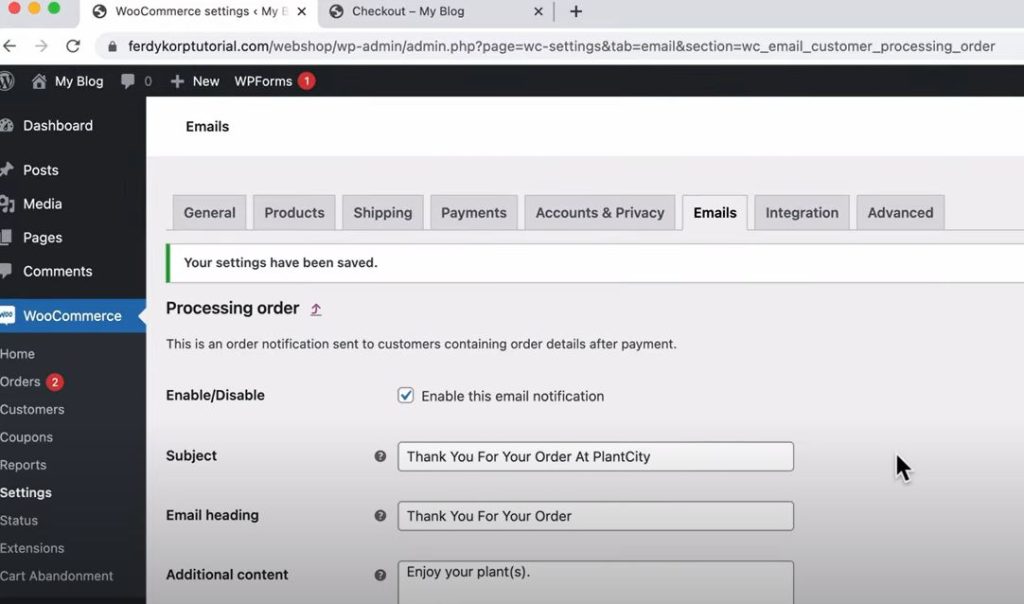
A truly personalized email experience can enhance both productivity and satisfaction, allowing you to tailor your email environment to fit your unique preferences and needs. Many email providers offer customization options, enabling you to adjust everything from the interface layout to the visual theme, aligning with your personal style or working environment. By selecting a theme or color palette that resonates with you, you can create a more inviting and engaging space for handling communications.
Beyond aesthetics, customizing your email folders or labels can significantly improve organization and prioritization. By creating specific categories or color-coded labels for different types of emails, such as project-related, personal, or urgent communications, you can quickly identify and respond to emails that require immediate attention. This level of organization reduces the risk of overlooking important messages in a crowded inbox.
Furthermore, you can customize email templates for recurring communications or responses that maintain consistency and save time. Whether you’re sending regular updates to a team or confirming appointments with clients, having predefined templates ensures you convey essential information without reinventing the wheel each time. Leveraging customization tools allows you to streamline processes and maintain a cohesive communication strategy, ultimately enhancing your overall email experience.
Mastering Advanced Email Techniques
To truly master the art of email communication, it’s important to delve into advanced techniques that can enhance your professional interactions. One powerful strategy is leveraging email analytics to gain insights into your communication patterns and recipient engagement. Many email platforms now offer built-in analytics tools that provide data on open rates, click-through rates, and response times. By understanding these metrics, you can adjust your approach to improve message effectiveness and tailor content to better meet the needs of your audience.
Another advanced technique involves the strategic use of delay send and email scheduling features. By timing your emails to be sent at optimal times—whether during business hours or when recipients are most likely to check their inboxes—you can increase the visibility and impact of your messages. This is particularly beneficial for communicating across different time zones or managing communications for global teams.
Furthermore, mastering the art of concise and clear email copywriting can significantly elevate the quality of your correspondence. By focusing on clear subjects, precise language, and succinct content, your emails become more engaging and easier to digest. Utilizing bullet points or numbered lists for complex information can also aid in readability and retention.
Lastly, consider utilizing email encryption and security settings to protect sensitive information. Ensuring your emails are secure not only safeguards personal and company data but also builds trust with your recipients. Integrating these advanced techniques into your routine can help you achieve a higher level of proficiency in email communications, making your interactions both efficient and impactful.
Implementing Email Automation for Seamless Workflows
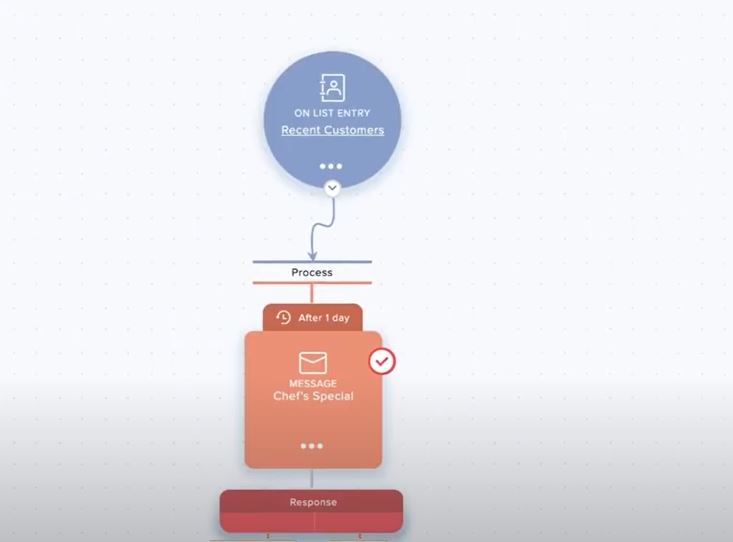
Incorporating automation into your email management can revolutionize the way you handle routine tasks, freeing up valuable time for more strategic activities. Email automation tools allow you to automate repetitive actions such as sorting incoming messages, sending follow-up reminders, or even managing email subscriptions. By setting rules and filters, you can automatically categorize and prioritize emails based on specific criteria such as sender, subject, or keywords, ensuring that important messages are addressed promptly.
Moreover, automated follow-up reminders can significantly enhance productivity, especially in settings that require constant communication with clients or team members. Tools that provide the ability to schedule reminders for unanswered emails help ensure that no critical conversation slips through the cracks, maintaining the flow of communication.
Additionally, consider leveraging email automation for marketing purposes. Automated email sequences can nurture leads by sending out a series of targeted messages over time, building relationships and engaging potential clients without the need for manual intervention. These tools can personalize content based on user behavior or preferences, increasing the relevance and effectiveness of your outreach.
By integrating email automation into your workflow, you not only optimize routine processes but also cultivate a more proactive approach to communication. This ultimately leads to more efficient operations and improved professional relationships, as you can focus your efforts on more meaningful engagements instead of getting bogged down by repetitive email tasks.
Enhancing Email Security and Privacy
As digital communication becomes a cornerstone of daily operations, prioritizing email security and privacy is essential for protecting sensitive information. Establishing robust security measures helps safeguard against potential threats such as phishing attacks, identity theft, and data breaches. Start by choosing an email provider that offers strong encryption and secure authentication methods, such as two-factor authentication, to enhance the protection of your account.
Additionally, be vigilant in recognizing phishing attempts and suspicious emails. Common indicators include unsolicited requests for personal information, unfamiliar sender addresses, and links leading to misleading websites. Educate yourself and your colleagues on identifying these signs to prevent falling victim to scams.
Regularly updating passwords and utilizing strong, unique passwords for each account can also mitigate security risks. Consider employing a password manager to maintain a secure record of your credentials while ensuring that they remain complex and confidential.
Implementing privacy settings within your email client is another proactive approach. By adjusting these settings, you can control who can access your information and determine the visibility of your communications. This not only bolsters your privacy but also instills confidence in your correspondents, knowing their information is handled with care.
By taking these steps, you can enhance the security and privacy of your email communications, ensuring a safe and trustworthy environment for both personal and professional exchanges.
Integrating Artificial Intelligence for Smarter Email Management
Incorporating artificial intelligence (AI) into email management practices can remarkably enhance efficiency by automating repetitive tasks and providing intelligent insights. AI-powered tools can analyze email content to organize and categorize messages automatically, allowing you to effortlessly maintain an organized inbox. These tools can also prioritize emails based on importance and urgency, ensuring you address critical matters promptly.
AI solutions can assist in drafting responses by suggesting relevant information, streamlining your workflow, and saving considerable time. These systems can learn from your past communications to offer personalized response templates, making email interactions more consistent and effective.
Moreover, AI-powered analytics can deliver insights into communication patterns, pointing out areas for improvement in email strategy and engagement with recipients. By leveraging data-driven insights, you can reframe your communication style to suit your audience better, driving more positive outcomes.
Taking advantage of AI’s advancements fosters a smarter approach to handling email, enhancing productivity, and ensuring time is spent on strategic activities rather than mundane organizational tasks. As AI continues to evolve, its integration into email management will become increasingly indispensable, revolutionizing our approaches to communication and collaboration.
Maximizing Email Productivity with Customization and Personalization
To further boost email productivity, it’s crucial to embrace customization and personalization strategies that can tailor your communications to be more effective and engaging. Customizing your email settings to align with your workflow preferences can make a significant difference. This includes organizing folders and labels to suit the way you prioritize tasks or setting specific alert tones for high-priority messages.
Additionally, personalization goes beyond addressing recipients by name. It involves crafting messages that resonate with the specific needs and interests of your audience. Utilize available data to segment your contacts and send targeted messages that speak directly to their challenges or goals. This approach not only captures attention but also fosters deeper connections and trust.
Furthermore, personalized email signatures can enhance your professional image. Ensure your signature includes all essential contact information along with a touch of creativity or branding in order to leave a lasting impression.
By leveraging both customization and personalization, you can refine your email strategy to be more concise and relevant, thereby maximizing productivity and improving overall communication efficacy. These tailored approaches enable you to deliver messages that are more likely to elicit a positive response, streamlining your email interactions into more fruitful engagements.
Streamlining Collaboration Through Unified Communication Platforms
In today’s fast-paced digital world, streamlining communication within teams is essential to maintain efficiency and collaboration. Unified communication platforms offer a cohesive solution by integrating various communication tools such as email, instant messaging, video conferencing, and file sharing into a single interface. This integration minimizes the need for switching between applications, allowing team members to focus on tasks without unnecessary distractions.
Through these platforms, teams can facilitate seamless interaction and real-time collaboration, regardless of location. Features like threaded conversations, collaborative document editing, and team workspaces foster a more organized and cohesive communication flow. Additionally, the ability to create dedicated channels for projects or departments helps streamline discussions and ensures that information is easily accessible to the relevant team members.
Furthermore, incorporating task and project management features within these platforms can enhance workflow visibility. By aligning communication with project timelines and milestones, teams can stay informed and coordinated, reducing the risk of miscommunication and project delays. As a result, integrating unified communication platforms not only enhances productivity but also strengthens the collaborative culture within organizations, making it easier to achieve collective goals efficiently.
Leveraging Cloud Technology for Enhanced Email Security
In the digital age, maintaining the security of email communications is paramount. Cloud technology offers robust solutions that can significantly enhance the security of your email system. By utilizing cloud-based email services, organizations can benefit from advanced encryption protocols that protect sensitive information from unauthorized access. These services often include features like two-factor authentication, which adds an extra layer of security by requiring users to verify their identity through another device or method.
Moreover, cloud solutions offer real-time threat detection and automated backups, safeguarding emails against potential cyber threats and data loss. With the ability to scale resources quickly, cloud platforms can effortlessly accommodate increased demand or adapt to organizational growth without compromising security measures.
Cloud-based email systems also facilitate seamless updates and maintenance, ensuring that the latest security patches are applied promptly to prevent vulnerabilities. This level of automated management reduces the burden on IT departments, allowing them to focus on more strategic initiatives.
Implementing cloud technology in email management not only enhances security but also improves flexibility and accessibility. Users can access their emails from virtually anywhere, given an internet connection, which promotes remote work capabilities and continuity of operations during unforeseen disruptions. Embracing cloud technology is therefore a strategic move towards securing email communications while supporting the dynamic needs of modern businesses.
Harnessing Artificial Intelligence for Smart Email Organization
Artificial Intelligence (AI) is revolutionizing the way we manage our emails by providing smarter organization solutions that enhance efficiency. AI-powered email clients can automatically categorize incoming messages based on their content, sender, or priority level, effectively managing your inbox with minimal manual input. This intelligent sorting reduces clutter and helps users focus on essential communications.
These AI systems employ machine learning algorithms to understand your email habits over time, adapting to your behavior and preferences. For instance, they can predict which emails you deem important and ensure those are highlighted prominently, while automatically filtering out spam or promotional content to a separate folder. This learning process enables the AI to become increasingly accurate and personalized, improving its performance continuously.
Moreover, AI-driven tools offer advanced search capabilities, allowing users to locate specific emails or attachments quickly, even among vast quantities of data. Features such as natural language processing can interpret search queries in conversational language, providing more intuitive interaction with your email archives.
Additionally, leveraging AI for email scheduling and auto-replies can save significant time. By analyzing your schedule and past email patterns, these tools can suggest optimal times for sending emails to increase the likelihood of engagement. Auto-reply features can handle routine inquiries, offering a quick response opportunity while freeing up your time to focus on more strategic tasks.
By adopting AI technologies in email management, businesses and individuals can greatly enhance their communication efficiency, ensuring that time is spent on valuable interactions rather than sifting through an overwhelming inbox.
Embracing Collaboration Tools for Remote Teams
The rise of remote work has prompted organizations to seek efficient collaboration tools that can support virtual teams effectively. These tools are essential for maintaining productivity, fostering engagement, and ensuring that remote employees feel connected to their teams. One of the primary advantages of these collaboration platforms is the ability to facilitate real-time communication, making it easier for team members to interact as if they were in the same physical space.
Features such as video conferencing and screen sharing enable face-to-face interactions, which are crucial for building trust and clear communication among team members. Furthermore, document collaboration tools allow multiple people to work simultaneously on a project, providing a unified workspace where contributions are instantly reflected and visible to all collaborators. This setup significantly reduces delays caused by outdated versions and ensures that everyone has access to the most current information.
Additionally, these platforms often include project management capabilities, such as task assignments and progress tracking, which help teams stay organized and aligned with project goals. By using a centralized platform, remote teams can easily manage tasks, delegate responsibilities, and monitor their collective progress, ensuring that projects are completed efficiently and on time.
The ability to integrate various third-party apps enhances the versatility of collaboration tools, accommodating different workflows and preferences. As remote work continues to become a norm in many industries, investing in robust collaboration tools is a strategic way to maintain a cohesive, productive, and engaged remote workforce.
Enhancing Cybersecurity in a Remote Work Environment
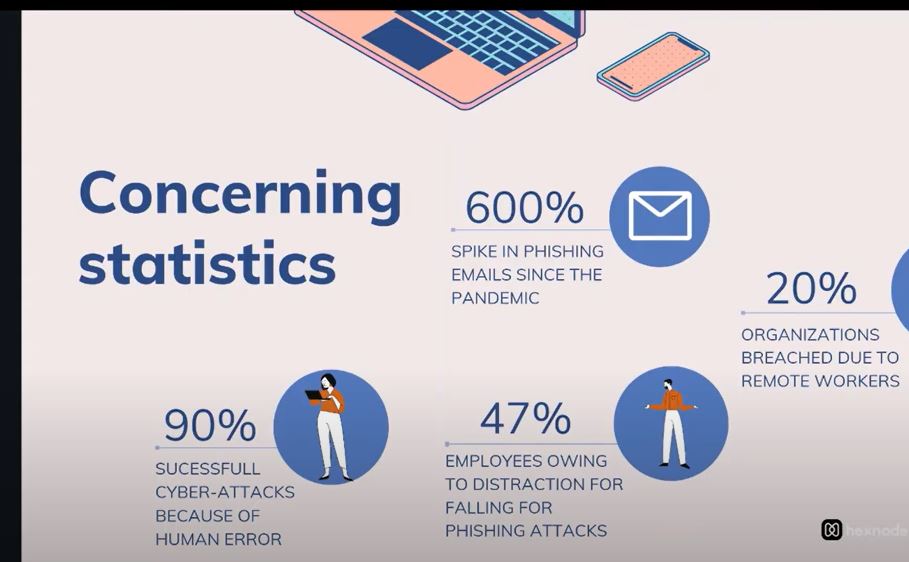
As organizations increasingly adopt remote work models, enhancing cybersecurity has become paramount. The shift to remote work has expanded the attack surface for cybercriminals, making it crucial for companies to implement robust security measures to protect sensitive data and maintain operational integrity.
One of the primary strategies for securing remote work environments is the use of Virtual Private Networks (VPNs). VPNs encrypt internet connections, providing secure access to company resources and preventing unauthorized interception of data. Additionally, investing in endpoint security solutions is essential to protect devices used by remote employees from malware, phishing, and other cyber threats.
As remote work continues to grow, it is imperative for organizations to proactively address cybersecurity concerns. By deploying comprehensive security strategies and fostering a culture of cybersecurity awareness, companies can protect their digital assets and ensure the resilience of their remote workforce.
