
The cost of an email marketing service varies significantly depending on the platform, the features offered, and the size of your email list.
Most services offer tiered pricing, where costs increase as your list grows or as you add more advanced features. Here, we’ll break down the pricing
for various email marketing services and discuss what to expect at different pricing levels.
Factors That Affect Email Marketing Service Costs :
| Factor | Description |
| Number of Subscribers | Many services price based on the number of subscribers in your list. The more subscribers, the higher the cost. |
| Email Sends | Some platforms charge based on the number of emails you send per month, while others charge based on your list size. |
| Features | Advanced features like automation, segmentation, A/B testing, and analytics are often available at higher pricing tiers. |
| Email Templates | Access to premium templates or the ability to create custom templates may incur additional costs. |
| Integrations and APIs | Some platforms charge extra for advanced integrations with CRMs, e-commerce tools, or other systems. |
| Support and Training | Advanced support or personalized training may be offered as part of higher-tier pricing plans. |
Cost Considerations for Businesses :
———————————–
1. Small Businesses and Startups:
For small businesses, it’s important to choose an affordable email marketing service that offers essential features without breaking the bank.
Services like Mailchimp and ConvertKit offer free plans for small lists, allowing you to test their features before committing to a paid plan.
Recommended Options: Mailchimp (Free for up to 500 subscribers), ConvertKit (Free for up to 300 subscribers), Benchmark Email (Free for up to 500 subscribers)
2. Growing Businesses:
As your list grows, you’ll need more advanced features such as automation, segmentation, and better analytics.
Services like ActiveCampaign and GetResponse provide robust tools for scaling your email marketing efforts.
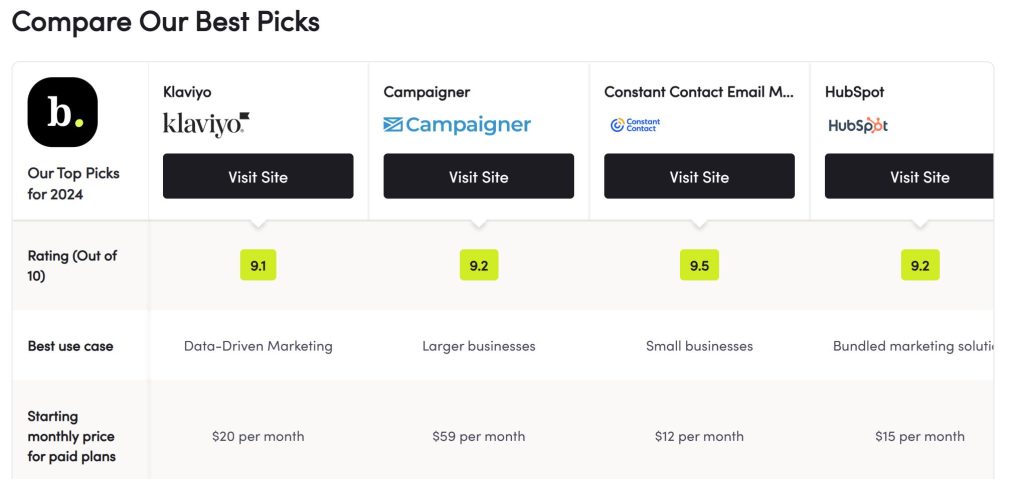
Recommended Options: ActiveCampaign (Starts at $29/month), GetResponse (Starts at $15/month)
3. E-commerce Businesses:
If you run an e-commerce business, you’ll benefit from email marketing services with powerful integrations and automation workflows that help you drive sales.
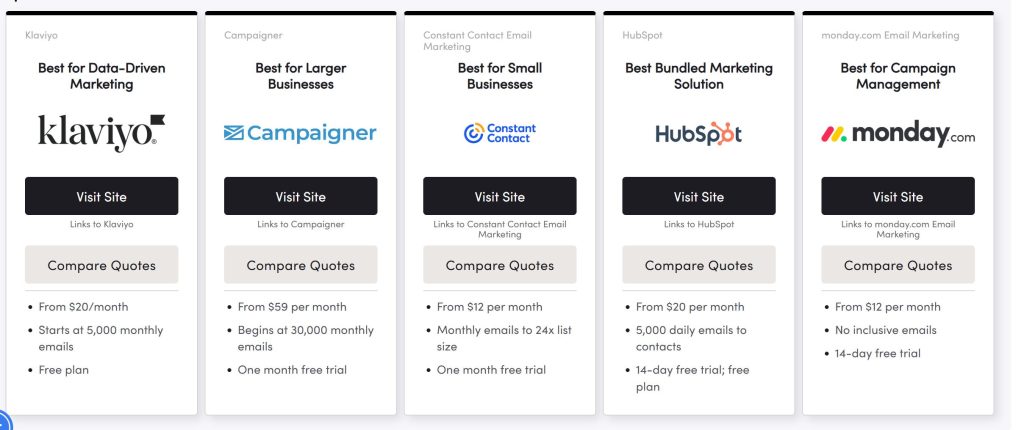
Platforms like Klaviyo offer advanced tools for personalized email campaigns tailored to customer behaviors.
Recommended Options: Klaviyo (Starts at $20/month), GetResponse (Includes e-commerce integrations), ActiveCampaign (Offers deep e-commerce automations)
4. Large Enterprises:
For larger enterprises with a significant number of subscribers and complex marketing needs, premium services with customizable plans and enterprise-level features may be necessary.
These services often include advanced segmentation, custom reporting, and high deliverability rates.
Recommended Options: Klaviyo (Custom pricing), ActiveCampaign (Starts at $149/month), SendGrid (Custom pricing)
Additional Costs to Consider
—————————-
Email Design Services: Some platforms offer pre-designed templates or the ability to create custom designs. If you hire a designer or purchase premium templates, this can add to your cost.
Are free email marketing plans enough for a growing business?
Free plans can work well for small businesses or those just starting, but as your list and needs grow, you may need to upgrade to a paid plan for more features and larger list capacities.
Do email marketing services charge by the number of emails or subscribers?
Most email marketing platforms charge based on the number of subscribers, though some also factor in the number of emails sent. Be sure to check the pricing structure for each platform.
Free Email Marketing Tools :
Top Free Email Marketing Tools
Why Use It: Ideal for creative marketers looking for polished designs.
Mailchimp (Free Plan)
Mailchimp Pricing and Features :
Mailchimp is a widely used email marketing platform known for its user-friendly interface and robust features. Below is a detailed breakdown of Mailchimp’s pricing plans and the features included in each plan.
| Plan | Price | Features |
| Free | Free (up to 500 subscribers) | Basic email templates, 1 audience, limited automation, analytics |
| Essentials | Starts at $13/month | Custom email templates, 3 audiences, A/B testing, 24/7 email & chat support |
| Standard | Starts at $20/month | Advanced automation, retargeting ads, behavioral targeting, advanced analytics |
| Premium | Starts at $350/month | Unlimited audiences, phone support, advanced segmentation, comparative reporting |
Best For: Beginners and small businesses.
Features: Up to 500 subscribers, basic email templates, and analytics.
Why Use It: Intuitive interface and integration with various platforms.
MailerLite (Free Plan)
Best For: User-friendly automation.
Features: 1,000 subscribers, automation tools, and landing pages.
Why Use It: Offers advanced features for startups on a budget.
Sendinblue (Free Plan)
Best For: Businesses needing CRM features.
Features: Unlimited contacts, 300 emails/day, and SMS marketing.
Why Use It: Combines email marketing with customer management.
Moosend (Free Plan)
Best For: E-commerce businesses.
Features: Unlimited emails, advanced analytics, and e-commerce integration.
Why Use It: Perfect for scaling e-commerce campaigns.
Benchmark Email (Free Plan)
Best For: Designing attractive emails.
Features: 500 subscribers, drag-and-drop editor, and email campaigns.
Why Use It: Ideal for creative marketers looking for polished designs.
How to Choose the Right Tool?
When selecting a free email marketing tool, consider:
- Subscriber Limits: Ensure the tool fits your audience size.
- Features: Focus on your business needs, like automation or CRM integration.
- Ease of Use: Opt for platforms with intuitive designs and tutorials.
Why Use Free Tools for Email Marketing?
- Cost-Effective: Great for startups and small businesses.
- Scalability: Start free, upgrade as your business grows.
- Insights: Gain valuable analytics to refine your strategy.
SEO Tips for Promoting Email Marketing Tools
- Keywords to Use: Free email marketing tools, email automation, budget-friendly marketing tools.
- Meta Description Example: “Discover the best free email marketing tools to enhance your campaigns. Compare top platforms like Mailchimp, MailerLite, and more!”
- Internal Links: Link to related articles like “10 Best Email Marketing Software of 2025” or “How to Improve Your Email Marketing Strategy.”
Top Free Email Marketing Tools
Email marketing is one of the most cost-effective ways to engage with your audience and grow your business.
For small businesses or those on a tight budget, free email marketing tools offer a great starting point without significant investment.
Below are some of the top free email marketing tools that deliver exceptional value.
| Tool | Free Plan Limitations | Key Features |
| Mailchimp | Up to 500 subscribers, 1,000 emails per month | Drag-and-drop email editor, basic templates, audience segmentation, analytics. |
| MailerLite | Up to 1,000 subscribers, 12,000 emails per month | Advanced automation, A/B testing, customizable email templates. |
| Benchmark Email | Up to 500 subscribers, 3,500 emails per month | Responsive email designs, surveys, polls, and basic automation. |
| Sendinblue | Unlimited contacts, 300 emails per day | SMS marketing, email personalization, and workflow automation. |
| Omnisend | Up to 250 contacts, 500 emails per month | E-commerce integrations, SMS, and automation workflows. |
| HubSpot Email Marketing | 2,000 emails per month, free CRM included | Drag-and-drop editor, email tracking, and integration with HubSpot CRM. |
| Moosend | Unlimited emails, free for up to 1,000 subscribers | Landing pages, automation, and reporting tools. |
| Zoho Campaigns | Up to 2,000 subscribers, 6,000 emails per month | A/B testing, workflows, and email templates. |
What Is Email Marketing Software?
Email marketing software is a digital tool that helps businesses create, send, and analyze email campaigns. It is an essential component of modern marketing strategies, enabling businesses to engage with their audience, drive conversions, and build lasting relationships.
Benefits of Using Email Marketing Software
- Saves Time and Effort:
Automation features handle repetitive tasks like scheduling and personalization, freeing up your time. - Enhances Personalization:
Send tailored messages based on user behavior, preferences, and purchase history. - Improves Engagement:
Use data-driven insights to craft better subject lines, content, and calls to action. - Boosts ROI:
Email marketing delivers one of the highest returns on investment compared to other digital marketing channels.
How Email Marketing Software Works
- List Management:
Collect and organize email subscribers into lists based on interests or demographics. - Campaign Design:
Create visually appealing emails using templates or custom designs. - Sending and Scheduling:
Schedule emails to send at optimal times based on user activity or time zones. - Performance Analysis:
Use built-in analytics to measure success, identify areas for improvement, and test different strategies.
Trends in Email Marketing Software (2025)
- AI-Driven Personalization:
Tools use artificial intelligence to craft dynamic, individualized content. - Interactive Emails:
Adding elements like polls, quizzes, or carousels to engage users directly within the email. - Omnichannel Marketing Integration:
Combining email with SMS, push notifications, and social media campaigns for a unified strategy.
SEO Tips for Promoting Email Marketing Software
- Keywords: What is email marketing software, benefits of email marketing tools, how email software works.
- Meta Description: “Learn what email marketing software is, how it works, and the benefits it brings to your business in 2025.”
- Internal Links: Link to articles like “10 Best Email Marketing Software of 2025” or “How to Improve Your Email Marketing Strategy.”
Factors That Affect Email Marketing Service Costs
| Factor | Description |
| Number of Subscribers | Many services price based on the number of subscribers in your list. The more subscribers, the higher the cost. |
| Email Sends | Some platforms charge based on the number of emails you send per month, while others charge based on your list size. |
| Features | Advanced features like automation, segmentation, A/B testing, and analytics are often available at higher pricing tiers. |
| Email Templates | Access to premium templates or the ability to create custom templates may incur additional costs. |
| Integrations and APIs | Some platforms charge extra for advanced integrations with CRMs, e-commerce tools, or other systems. |
| Support and Training | Advanced support or personalized training may be offered as part of higher-tier pricing plans. |
Pricing Breakdown for Popular Email Marketing Services
| Email Marketing Service | Free Plan | Basic Plan | Advanced Plan |
| Mailchimp | Up to 500 subscribers | Starts at $13/month (up to 500 subscribers) | Starts at $20/month |
| ActiveCampaign | 14-day free trial | Starts at $29/month (500 subscribers) | Starts at $149/month (5,000 subscribers) |
| Klaviyo | Free for up to 250 subscribers | Starts at $20/month (up to 500 subscribers) | Custom pricing (larger lists) |
| ConvertKit | Free for up to 300 subscribers | Starts at $9/month (up to 500 subscribers) | Starts at $25/month |
| GetResponse | Free for up to 500 subscribers | Starts at $15/month (up to 1,000 subscribers) | Starts at $49/month (2,500 subscribers) |
| SendGrid | 100 emails/day for free | Starts at $15/month (up to 40,000 emails/month) | Custom pricing for higher volumes |
| Constant Contact | 30-day free trial | Starts at $9.99/month (up to 500 subscribers) | Starts at $45/month (up to 2,500 subscribers) |
| Benchmark Email | Free for up to 500 subscribers | Starts at $13.99/month (up to 600 subscribers) | Starts at $29.99/month (1,500 subscribers) |
Tips to Improve Your Email Marketing Strategy :
Email marketing is a powerful tool for businesses of all sizes. However, to truly capitalize on its potential, you need a well-thought-out strategy. Here are six essential tips to help you optimize your email marketing campaigns and achieve better results.
1. Segment Your Email List
Why It’s Important:
Segmentation allows you to tailor your messages to specific groups of subscribers based on their interests, behaviors, or demographics. This targeted approach increases relevance and engagement, ensuring your emails resonate with your audience.
How to Do It:
- Behavioral Segmentation: Segment your list based on past purchases, website interactions, or email opens.
- Demographic Segmentation: Organize by age, location, job title, or any other relevant criteria.
- Engagement-Based Segmentation: Separate engaged subscribers from those who haven’t interacted with your emails in a while and send targeted re-engagement campaigns.
2. Use Personalization
Why It’s Important:
Personalized emails drive higher engagement rates. People are more likely to open and interact with emails that feel relevant to them. Personalized content can also improve customer loyalty and trust.
How to Do It:
- Dynamic Content: Include the recipient’s name in the subject line or body of the email.
- Tailored Offers: Send personalized product recommendations or discounts based on user behavior or past purchases.
- Behavioral Triggers: Set up automated emails triggered by specific actions, like an abandoned cart or a product review request.
3. Optimize for Mobile
Why It’s Important:
With more than 50% of emails being opened on mobile devices, it’s crucial that your emails are mobile-friendly. A poorly designed email can lead to frustration and unsubscribes.
How to Do It:
- Responsive Design: Use templates that automatically adjust to the screen size of the device being used.
- Short Subject Lines: Ensure subject lines are concise and visible on small screens.
- Clear CTA Buttons: Make sure your call-to-action buttons are large enough to click easily on mobile devices.
4. A/B Test Your Campaigns
Why It’s Important:
A/B testing allows you to test different elements of your emails to see what works best. It could be the subject line, the CTA button, the email copy, or the visuals. Consistently optimizing your emails based on data can lead to improved open rates, click-through rates, and conversions.
How to Do It:
- Test Subject Lines: Try different approaches, such as using curiosity-driven or value-driven subject lines.
- Test Send Times: Experiment with different days and times to find the optimal sending schedule for your audience.
- Test Visuals and Layouts: Compare different image placements, fonts, and CTA designs to see what resonates most with your audience.
5. Provide Value in Every Email
Why It’s Important:
If your subscribers don’t find value in your emails, they’ll quickly lose interest and unsubscribe. Ensure that each email you send has a purpose, whether it’s to educate, inform, or entertain.
How to Do It:
- Exclusive Offers: Provide discounts or early access to new products or services.
- Educational Content: Share tips, tutorials, and blog posts that are relevant to your audience’s interests.
- Entertaining Emails: Send engaging content like quizzes, polls, or fun facts to keep your audience interested.
6. Monitor and Analyze Performance
Why It’s Important:
Continuous monitoring of your email marketing campaigns helps you understand what’s working and what’s not. It allows you to make data-driven decisions to refine your strategy and improve results over time.
How to Do It:
- Track Open and Click Rates: Measure how many people are opening your emails and clicking on links to gauge engagement.
- Analyze Conversion Rates: Track how many email recipients are completing your desired actions, such as making a purchase or filling out a form.
- Review Bounce and Unsubscribe Rates: High bounce or unsubscribe rates may indicate issues with your content or targeting.
FAQs About Email Marketing Software
How often should I send emails?
The frequency depends on your audience and business type. However, it’s important to find a balance. Too many emails can lead to unsubscribes, while too few can cause disengagement.
What’s the best way to segment my email list?
Start with basic segmentation based on demographics and behavior, then refine it over time as you gather more data on your subscribers.
Should I always personalize my emails?
Personalization can significantly boost engagement, but make sure it’s relevant. Avoid overdoing it, as it can seem forced or intrusive.
How much can I earn through email marketing?
Your earnings depend on your audience size, engagement rate, and monetization methods. Small businesses might earn a few hundred dollars per month, while larger brands can make thousands.
Is affiliate marketing a good way to make money with email?
Yes, affiliate marketing is a great way to monetize your email list, especially if you promote relevant products that your audience is likely to purchase.
How do I avoid being too salesy in my emails?
Focus on providing value first. Whether it’s through useful content, exclusive offers, or personalized recommendations, your subscribers will appreciate content that helps them, not just sales pitches.